
Sheet 04 of 12
Flanges on Several Edges: Corners, Gap and Corner Reliefs
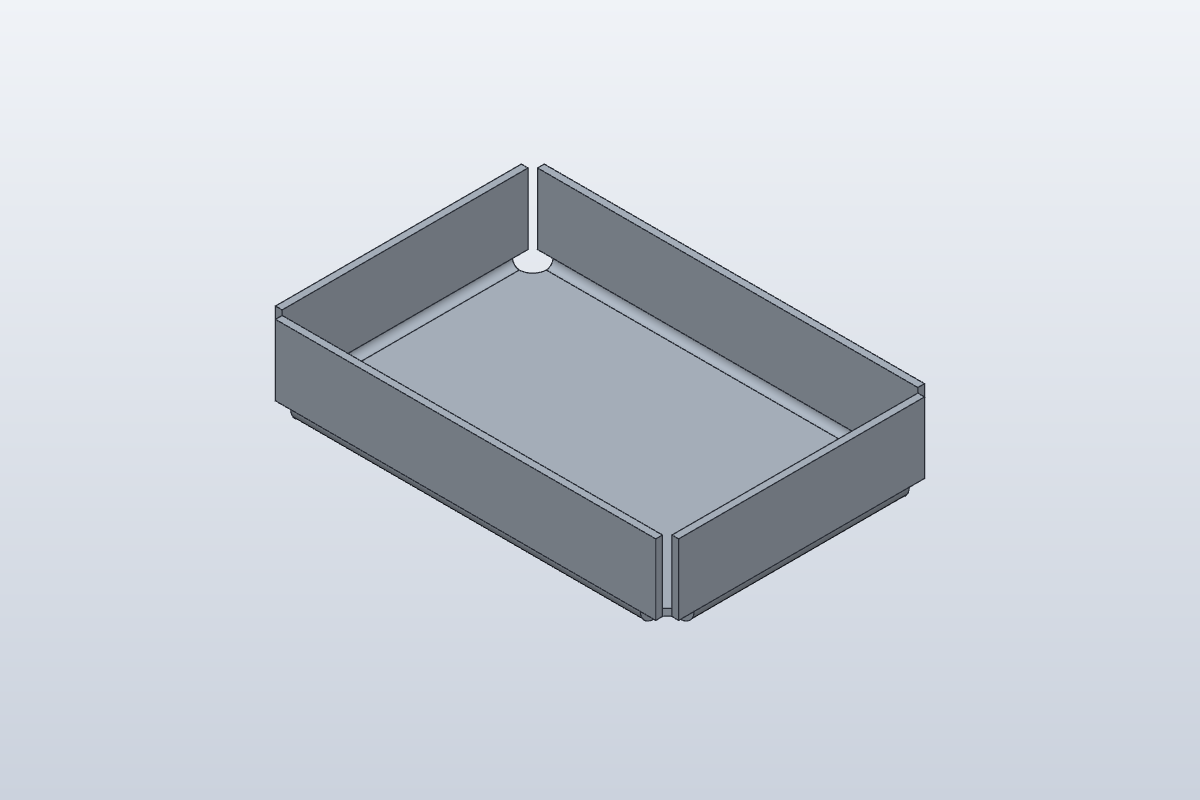
In 6 minutes you'll fold up all four walls of a tray in one Flange, see how SolidCraft closes the corners with a gap, and choose a corner relief shape.
- Part
- Corners and Reliefs
- Rule
- Steel 2mm
- Sheet
- t 2 · R 2 · K 0.4
- Time
- 6 min
- Status
- Open
OP 10Watch
Video in productionBuild along with the steps in OP 30 meanwhile.
Chapters
- 00:00A tray from one flat sheet
- 00:30The base
- 01:00Four edges, one Flange
- 02:00The corners and the Flange Gap
- 02:50Corner relief shapes
- 04:00Read the bends in the bend table
- 04:40Common mistake: one wall at a time
- 05:20Your exercise
OP 20Turn the part
Drag to turn, scroll or pinch to zoom. Flat shows the blank before it is bent: the same sheet, the same frame.
OP 30Build it in SolidCraft
Your task
Make this tray in SolidCraft 0.21:
- In a new design, make the rule Steel 2mm (thickness 2 mm, bend radius 2 mm, K Factor 0.4), Active rule ticked. Leave its corner values as they come.
- Sketch a 120 × 80 mm rectangle on the XY plane, corner at the origin. Finish the sketch.
- Flange on the rectangle: the base.
- Flange again and click the top edges of all four sides: the long front edge first, then the others going round.
- Height 25 mm, Angle 90 deg, Bend Position Inside. OK.
- Click Flat Pattern (Sheet Metal tab › Flat): write down both numbers of Flat size.
- Click Export Bend Table…, save the CSV, open it and write down length_mm for bend 1.
- Edit the flange (double-click it in the timeline), open Advanced, set Corner Relief Shape to Round and leave Corner Relief empty. OK.
- Export the bend table again and write down bend 1's length_mm.
What to write down
- Both numbers of the flat size (they don't change with the relief shape).
- Bend 1's length with the Notch corner (the rule's default).
- Bend 1's length with the Round corner relief.
Bend 1 is the first edge you picked. Type the values below and press Check. The bend table opens in any spreadsheet app or text editor.
OP 40Inspect
Enter what SolidCraft shows you. Each value is checked against SolidCraft's own result, within the tolerance shown. Nothing you type leaves this page.
Show the drawing and bend table
exercise · Steel 2mm · t 2 · R 2 · K 0.4Flat blank 162.797 × 122.796 mm · 4 bends
| Bend | Angle | Dir. | R mm | Length mm | Allowance mm |
|---|---|---|---|---|---|
| 1 | 90° | up | 2 | 112 | 4.398 |
| 2 | 90° | up | 2 | 72 | 4.398 |
| 3 | 90° | up | 2 | 112 | 4.398 |
| 4 | 90° | up | 2 | 72 | 4.398 |
exercise-round · Steel 2mm · t 2 · R 2 · K 0.4Flat blank 162.797 × 122.796 mm · 4 bends
| Bend | Angle | Dir. | R mm | Length mm | Allowance mm |
|---|---|---|---|---|---|
| 1 | 90° | up | 2 | 104 | 4.398 |
| 2 | 90° | up | 2 | 64 | 4.398 |
| 3 | 90° | up | 2 | 104 | 4.398 |
| 4 | 90° | up | 2 | 64 | 4.398 |
OP 50Quiz
Q1Why pick all four edges in the same Flange?
The corners are closed, with the rule's gap, only between flanges of one feature.
Q2Where does the gap between two walls at a corner come from?
Flange Gap is a rule value; by default it equals the thickness.
Q3You switch the corner relief from Notch to Round. What changes?
The round relief is cut out of the corner and the bends stop where it begins; the flat size stays the same.
Every value is within tolerance. This sheet is done.
Sheet 05: Contour Flange